Flashing and installation
Hardware Installation
PCB soldering will take around 10 minutes wire soldering will take around 7 minutes
- Flash SD card with Ubuntu 20.04-4.9 via etcher
- Solder 2 pin header to pcb
- Solder 40 pin header to pcb
- Solder DC jack to pcb
- Solder 4xRJ45 ports to pcb

- Cut a red and black wire with a length of
50mm - Solder the wires to the +12v/GND header on the odroid
- Solder the other ends to a 2 pin socket header
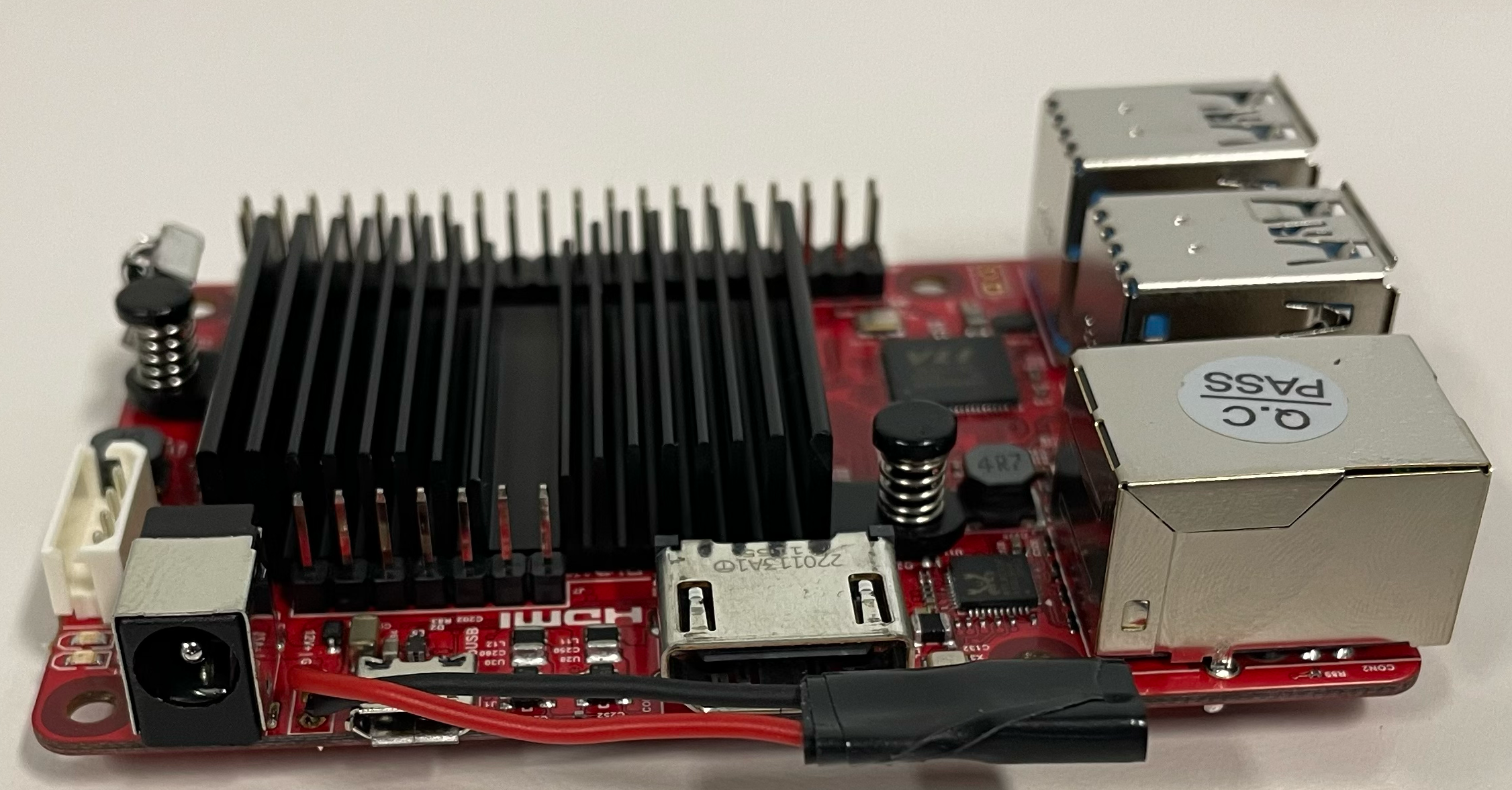
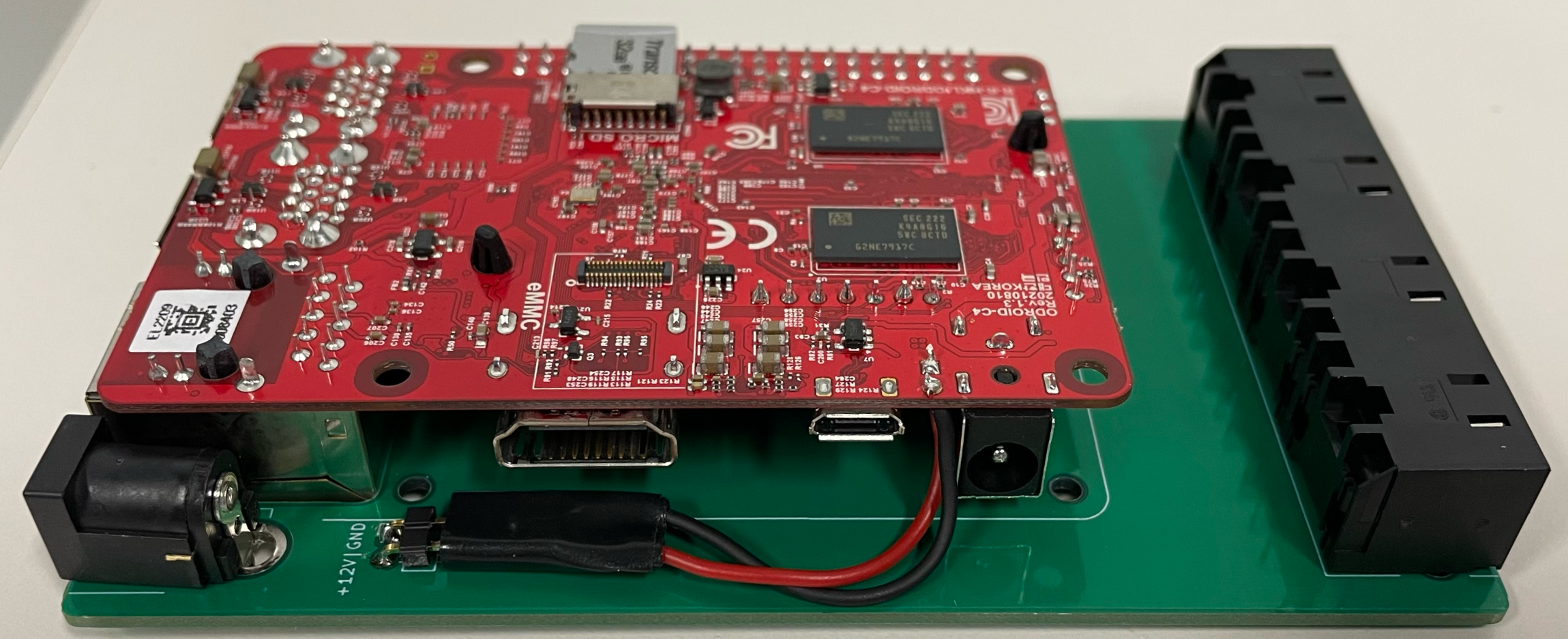
- First connect the header to the main board
- Then slide in the odroid into the main board
Packaging & Casing
This will take around 6 minutes
Installation
This will take around 5 minutes
Prerequisites
- Add root ssh keys (default password is
odroid)
# Run on the host machine where the keys are stored

export HOST_IP=x.x.x.x
echo "
sk-ssh-ed25519@openssh.com AAAAGnNrLXNzaC1lZDI1NTE5QG9wZW5zc2guY29tAAAAIBrjMvIr/GA6zHA/cFnk49mpt9+rI58M/rgJOTkd8IP9AAAAE3NzaDp0cmlrdGhvbS1yb290LWE= trikthom-root-a
sk-ssh-ed25519@openssh.com AAAAGnNrLXNzaC1lZDI1NTE5QG9wZW5zc2guY29tAAAAIG0DwMFm7oUaOD8KvV9819Y9bB6vCCjHPzngX3cWmIzzAAAAE3NzaDp0cmlrdGhvbS1yb290LWI= trikthom-root-b
ssh-ed25519 AAAAC3NzaC1lZDI1NTE5AAAAIIgXyUPME1TLGquHDJsDSoUFrCbrri1edogFksTG94t5 remote@trikthom.net
" | ssh root@$HOST_IP "mkdir -p ~/.ssh && cat >> ~/.ssh/authorized_keys"
- Login to the client machine as
rootwith default passwordodroid
ssh root@$HOST_IP
- Install
docker
# Logged in as root

apt update
apt install -y docker.io
- Login to
ghcr.iowithtrikthombotcredentials from 1Passwordo5rrrrvqzbarxg4rdmvsbxglte(1Password -T TrikThom Bot - Harmony Beta Participant)
docker login ghcr.io -u trikthombot
- Disable password login
sudo sed -E -i 's|^#?(PasswordAuthentication)\s.*|\1 no|' /etc/ssh/sshd_config
if ! grep '^PasswordAuthentication\s' /etc/ssh/sshd_config; then echo 'PasswordAuthentication no' |sudo tee -a /etc/ssh/sshd_config; fi
sudo systemctl restart ssh.service
Add remote tunnels
- Get an available
REMOTE_IDfrom the Edge Database - Add
1000to theREMOTE_IDto get theREMOTE_TELEMETRY_ID - Subtract
1000from theREMOTE_IDto get theREMOTE_SSH_ID - Get the
REMOTE_AUTHkey from 1Passwordahzt6bohxussuy2eg5mp4hfvmq
export REMOTE_ID=xxxx
export REMOTE_AUTH=xxxx
export REMOTE_TELEMETRY_ID=$(($REMOTE_ID + 1000))
export REMOTE_SSH_ID=$(($REMOTE_ID - 1000))

docker run -d --restart always --network=host  --name harmony-remote jpillora/chisel client --auth harmony:$REMOTE_AUTH https://remote.trikthom.com R:$REMOTE_ID:0.0.0.0:8082
docker run -d --restart always --network=host  --name harmony-remote-ssh jpillora/chisel client --auth harmony:$REMOTE_AUTH https://remote.trikthom.com R:$REMOTE_SSH_ID:0.0.0.0:22
docker run -d --restart always --network=host  --name harmony-remote-telemetry jpillora/chisel client --auth harmony:$REMOTE_AUTH https://remote.trikthom.com R:$REMOTE_TELEMETRY_ID:0.0.0.0:9100
Install harmony
DOCKER_PASSWORDis theghp_token from 1Passwordo5rrrrvqzbarxg4rdmvsbxglteINFLUX_TOKENfrom 1Password ``
export DOCKER_USERNAME=trikthombot
export DOCKER_PASSWORD=xxxx
export DOCKER_IMAGE=ghcr.io/trikthom/harmony
export INFLUX_TOKEN=jM4rE2VFb2bySf6IAjJGkRVpQ6bPB8k83p3fwP9vUVn3w7hWZAOP4LHWhlBs0gzEYGUylsqRvlFMuGtR-4w2og==
export HARMONY_PIN=xxxx
docker pull ghcr.io/trikthom/harmony/agent
docker run -d --name harmony-agent --restart always --network=host --privileged \
-v /var/run/docker.sock:/var/run/docker.sock \
-e DOCKER_USERNAME=$DOCKER_USERNAME \
-e DOCKER_PASSWORD=$DOCKER_PASSWORD \
-e DOCKER_IMAGE=$DOCKER_IMAGE \
-e INFLUX_TOKEN=$INFLUX_TOKEN \
-e HARMONY_PIN=$HARMONY_PIN \
ghcr.io/trikthom/harmony/agent

curl -X POST localhost:8080/api/setup
Install node-exporter
docker run -d --name node-exporter --restart always -p 9100:9100 prom/node-exporter